Your Contract

Your Contract in NJSTART

Your Marketplace listing is a sales channel, not a filing cabinet. Our team sets up most of it for you — here’s how to review it and enhance how your contract shows up to New Jersey buyers.


Step 1
Create your profile and learn how NJSTART works

Get Set Up

Step 2 (You're Here)
Review your contract and make your Marketplace listing work harder for you

Get Found

Step 3
Report your quarterly sales and remit any PEP fee your contract requires

Stay Compliant

Step 4
Guides, templates, tools, and a team ready to help you win more business

Grow & Get Help

Your Contract in NJSTART

Take a look at how we promote your contract in NJSTART

  1. Your Contract In the NJSTART Marketplace

    What do buyers see?
    4:00


    This video will walk you through what a typical shopper from a Local Agency would see when searching for contracts in the NJSTART Marketplace. 


    Our team provides most of the basic information for you. This information comes from your contract in NJSTART. 


    As a Vendor, you have the option to enhance some of the information in the Marketplace. To see how, view the next lesson: Enhance Your Contract In The NJSTART Marketplace

  2. Enhance Your Contract in NJSTART

    This is your chance to help buyers choose you. Tell us more about your company and we’ll add it to your Marketplace contract page — so shoppers see who you are, what sets you apart, and how to buy from you.

     

Enhance Your Contract In NJSTART

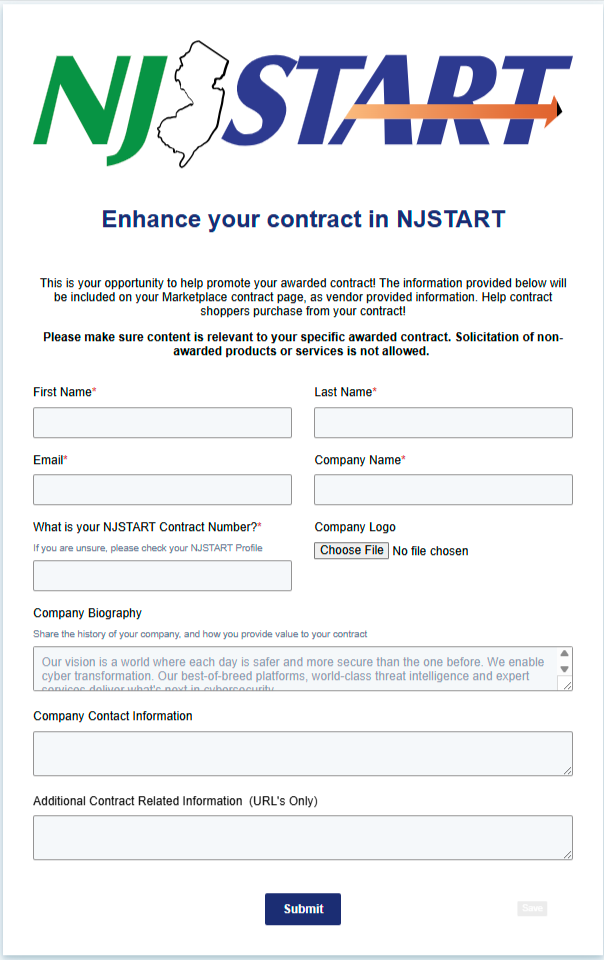
We aim to make it as easy as possible to enhance your contract in the NJSTART Marketplace. To do so, we ask that you fill out this form with more detailed information about your company so that we can help you as quickly as possible.

  • Customize what buyers see
  • Add additional marketing content
  • Tell buyers how to purchase from you

View Form

NJSTART Marketplace Form Image

Frequently Asked Questions

Ask us a Question

No Results

How do I find vendors/suppliers for what I need to purchase?
  • You can search for vendors without signing in to NJSTART, however you get much more by signing in. Go to https://www.njstart.gov and search vendors using keywords.
  • When signed in to NJSTART, you can review all contract related attachments such as the original solicitation documents, price lists, and methods of operation if applicable. You can also verify the vendor’s Business Registration Certificate and AAEEOC status among other key features.
  • Marketplace is an integral component of the NJSTART eProcurement system. It allows suppliers to load product/service catalogs related to their contracts with the State. Once catalogs are in place, State users and local governments will use the Marketplace to search for State contracts, shop from them (shopping basket functionality), and generate POs that will be transmitted to the supplier electronically.
How do I find vendors/suppliers for what I need to purchase?
  • You can search for vendors without signing in to NJSTART, however you get much more by signing in. Go to https://www.njstart.gov and search vendors using keywords.
  • When signed in to NJSTART, you can review all contract related attachments such as the original solicitation documents, price lists, and methods of operation if applicable. You can also verify the vendor’s Business Registration Certificate and AAEEOC status among other key features.
  • Marketplace is an integral component of the NJSTART eProcurement system. It allows suppliers to load product/service catalogs related to their contracts with the State. Once catalogs are in place, State users and local governments will use the Marketplace to search for State contracts, shop from them (shopping basket functionality), and generate POs that will be transmitted to the supplier electronically.
How do I find vendors/suppliers for what I need to purchase?
  • You can search for vendors without signing in to NJSTART, however you get much more by signing in. Go to https://www.njstart.gov and search vendors using keywords.
  • When signed in to NJSTART, you can review all contract related attachments such as the original solicitation documents, price lists, and methods of operation if applicable. You can also verify the vendor’s Business Registration Certificate and AAEEOC status among other key features.
  • Marketplace is an integral component of the NJSTART eProcurement system. It allows suppliers to load product/service catalogs related to their contracts with the State. Once catalogs are in place, State users and local governments will use the Marketplace to search for State contracts, shop from them (shopping basket functionality), and generate POs that will be transmitted to the supplier electronically.
How do I find vendors/suppliers for what I need to purchase?
  • You can search for vendors without signing in to NJSTART, however you get much more by signing in. Go to https://www.njstart.gov and search vendors using keywords.
  • When signed in to NJSTART, you can review all contract related attachments such as the original solicitation documents, price lists, and methods of operation if applicable. You can also verify the vendor’s Business Registration Certificate and AAEEOC status among other key features.
  • Marketplace is an integral component of the NJSTART eProcurement system. It allows suppliers to load product/service catalogs related to their contracts with the State. Once catalogs are in place, State users and local governments will use the Marketplace to search for State contracts, shop from them (shopping basket functionality), and generate POs that will be transmitted to the supplier electronically.