Every Contract Holder reports their sales each quarter. If your contract includes Procurement Efficiency Program (PEP) terms, you’ll also remit a 1% fee on those sales. Here’s exactly how both work — and when they’re due.
Learn how to report your sales and pay the related PEP fees
Reporting Your Sales
Every quarter, report your Net Purchases under your State contract — including sales to State agencies and to local public purchasing entities such as municipalities, counties, school districts, colleges, and other political subdivisions (inclusive of political subdivisions).
Every NJSTART Contract Holder reports their sales each quarter. Some contracts also include Procurement Efficiency Program (PEP) terms — a 1% quarterly fee on contract sales. If your contract includes PEP terms, remit the 1% fee on the sales you reported above. Not sure whether this applies to you? Check the contract terms in your NJSTART profile, or contact the team and we’ll confirm.
There are 2 convenient options to remit the required fees:
Reporting is not retroactive. Reporting starts on the effective date of a newly awarded contract or for a contract with a Participating Amendment, the date the new amendment was fully executed.
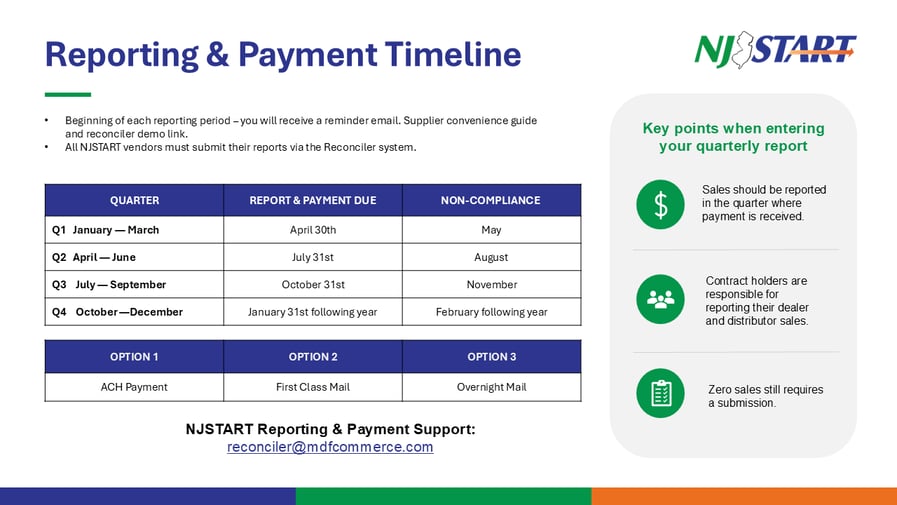
Mark these quarterly dates so reporting, and any fee, is never a scramble.
Fees that fund procurement operations, cooperative programs, and systems are common across the U.S. They modernize the buying experience for public-sector buyers and improve the services available to you as a Vendor. NJSTART enables you to load your product or service catalogs for search and ordering in the NJSTART Marketplace, and many Vendors also benefit from promotional campaigns to public-sector buyers and support with reporting and remittance requirements.
Why isn’t the State paying for its procurement operations and systems?
Many states fund procurement operations and software the same way. The fee has participating Vendors fund the technology and the team that signs up new buyers, markets and advertises your State contract items, and helps drive more purchases through your contract.
Does the 1% fee apply to all sales on my State contract?
Yes. On September 6, 2022, the New Jersey Administrative Code (N.J.A.C. 17:12, subsection 1.5) was amended so the Procurement Efficiency Program (PEP) assesses a percentage fee on the value of all transactions on each contract, including Cooperative Purchasing Participants. The fee is not retroactive: it starts on the effective date of a newly awarded contract, or — for an existing contract — on the date the amendment was fully executed. Please confirm your State contract terms and conditions before you begin quarterly sales reporting.
If I hold multiple NJ State contracts, are fees reported and paid collectively or separately by contract?
Separately. You report and pay for each contract on its own.
Can I negotiate the 1% PEP fee?
No. To keep it fair for everyone, the 1% PEP fee is applied consistently across all eligible State contracts.
Can I reflect the 1% PEP Fee as a separate price line on my contract and/or invoices?
No. Like other costs of doing business, the fee must be built into your contract pricing.
What if I have other business with New Jersey public purchasing entities that isn’t or won’t be sourced through the State contract, do I have to pay the PEP Fee?
No. The PEP fee applies only to sales made through your State of New Jersey contract.
Does the PEP Fee apply to gross purchases on the contract?
It applies to "Net Purchases," not gross - but how Net Purchases is defined depends on how your contract came into the PEP. If your contract was awarded from a solicitation or participating addendum that included the PEP fee, Net Purchases means your total contract sales less credits, taxes, regulatory fees, and separately stated shipping charges not included in unit prices. If your contract was awarded from a solicitation that did NOT include the PEP fee, Net Purchases means the same, plus clearly agreed-to "pass-throughs."
Contract Terms
Will my current contract still be valid?
Yes. Apart from the amendment, the terms of your contract stay the same — including reporting and auditing, which are already conditions of most State contracts.
Will the State agree that the fee will not be applied retroactively, and that any invoice that relates to an encumbrance (Release PO) issued prior to the signing of the PEP Fee Amendment will not be subject to the fee?
Yes. Fees are NOT assessed on invoices tied to Release POs, Punchouts and sales to local public organizations before your participation as detailed in your contract. Once your contract is participating, all transactions issued under it must be reported and are subject to the fee.
Can I redline the amendment and/or terms for the PEP?
Submit any exceptions to the PEP Fee Amendment in writing to vendors@njstart.info. To request changes to your State of New Jersey contract because of the PEP, send your request in writing to the same address and our team will route it to the right contact at the State Division of Purchase and Property.
Are there exemptions to participating in the PEP?
Exemptions are granted on a limited basis, at the discretion of the Division of Purchase and Property.
Payment
What options do I have to pay the PEP Fee? The current payment options are:
Payment Option 1: ACH – Direct to Periscope
Bank: Texas Capital Bank, N.A.
Address: 2000 McKinney Ave., Dallas, TX 75201
Phone: 877-839-2265
Account Type: Checking Routing: 111017979
Account Number: 4011036870
Account Name: Periscope Intermediate Corp, New Jersey Operating Account
Payment Option 2: Remittance Addresses for Checks
First Class Mail
Periscope Intermediate Corp
PO BOX 674844
DALLAS TX 75267-4844
Overnight
Periscope Intermediate Corp
LOCKBOX NUMBER 674844
1200 E CAMPBELL RD STE 108
RICHARDSON TX 75081
Reporting
When must I submit reporting and pay the PEP Fee?
Quarterly sales reports are due within thirty (30) calendar days after the end of each calendar quarter. Quarters end March 31, June 30, September 30, and December 31.
What does my company need to include in quarterly sales reporting?
All contracts are required to report. Please include: complete, accurate details of all sales, credits, returns, and refunds for the quarter; the purchasing entity; the total PEP fee due for the quarter (if applicable); and any other information the State may reasonably request. If you made no sales during the quarter, still file a report showing zero sales and zero PEP fee due.
Must I still comply with other reporting requirements in my State contract?
Yes. All reporting requirements in your State contract remain in effect.
Must my company report and pay the PEP Fee if the transaction was not done through the NJSTART system?
Yes. Reporting and fee requirements are tied to your State of New Jersey contract, no matter how the sale is transacted.
Are vendors required to report?
Yes, according to the executed contract all vendors designated as open to NJ Cooperative Purchasing are required to report.
Marketplace
Who can see my catalog in Marketplace?
Only State agency and New Jersey Cooperative Purchasing Entity users can view contracts and vendor presences in the NJSTART Marketplace. Vendors cannot see other Vendors' Marketplace presence or pricing when logged in to NJSTART. Please reach out to the NJSTART team to review your NJSTART Marketplace presence.
Are Vendors required to build a catalog in the Marketplace?
The PEP terms ask you to participate in building your online Marketplace presence. If you don't, the State (and SOVRA) reserve the right to create an informational presence on your behalf.
Will Vendors be required to develop "punchouts" in the NJSTART Marketplace?
No. Creating a punchout site is optional. Vendors may either implement a PunchOut site (with DPP approval) or upload their catalogs directly to the Marketplace for buyer search and purchasing. Please contact our NJSTART team if you are interested in integrating a punchout. For vendors that will not be pursuing a punchout integration, our team is here to help build your presence in the NJSTART Marketplace.
Participation
What do I need to do to participate (if my contract language does not include the PEP terms)?
Step 1: Sign the contract amendment and return it to vendors@njstart.info. Step 2: Watch for an email with a link to a short training video on setting up your catalog in the Marketplace. Step 3: Work with our team to load your catalog. Step 4: Start receiving orders. Step 5: Report quarterly on all purchases made through your contract and remit your fee.
Support
Who do I reach out to if I have questions about NJSTART?
Email vendors@njstart.info with as much detail as possible, including your company name and State contract number. For help using NJSTART-Reconciler to report sales and pay fees, contact reconciler@mdfcommerce.com - again with your company name and State contract number.
Contact Form
Questions about submitting a report or remitting your fee? Contact the Compliance Team by emailing them directly: