
As another year comes to a close, we're sharing practical reminders, Marketplace tips, State contract updates and a look at where NJSTART has been throughout New Jersey and where we're headed next.
The goal is simple: help your organization get more value from NJSTART while making State contract purchasing easier to navigate.
Thank You to Our Local NJSTART Community
As we close out the year, we want to thank the local governments, schools, authorities, and other public organizations that continue to use NJSTART to support their procurement needs. Your participation strengthens New Jersey’s cooperative purchasing community, and we sincerely appreciate your continued partnership and trust.
As we look ahead to the new year, we’re also exploring ways to provide local organizations with greater visibility into their NJSTART purchasing activity and vendor reporting. Our goal is to make it easier for organizations to review and audit their purchases, understand supplier-reported activity, and have greater transparency into their use of NJSTART contracts.
Thank you for being part of the NJSTART community. We appreciate your partnership this year and look forward to continuing to support you in the year ahead.
Search Smarter: Finding the Right Contract and Vendor in NJSTART
Front-end validation of price, item, and vendor information can make the downstream procurement/compliance process smoother. Conducting a smarter search can make State contract purchasing easier. When searching NJSTART, try using the most distinctive part of the vendor’s name rather than the full organization name.
For example, ACCSES NJ stands for Association for Choices in Community Supports and Employment Services NJ. Instead of entering the entire name, search using “Choices.” This narrows the search to five records, making it much easier to review the results and identify the appropriate vendor and contract.
Once you’ve found the vendor, don’t stop there. Confirm the supplier is associated with the appropriate State contract, review the contract record and attachments, and make sure the State contract number appears on your quote.
A few minutes spent verifying this information upfront will help reduce purchasing “ping-pong” and make the process smoother for both you and your Procurement office.
Buyer Tip: Before You Hit Submit
Before a State contract purchase request goes to your Purchasing office, pause for a quick purchase-ready check.
The Purchase-Ready Checklist
✓ Did I identify the appropriate State contract and purchasing process?
Don't just identify the contract number. Review the Method of Operation or other applicable instructions to determine whether additional processes, including a mini-bid, are required.
✓ Is the vendor authorized under that contract?
A vendor doing business with your organization does not automatically mean every product or service it offers is available under every State contract.
✓ Did I review the contract requirements and confirm my purchase is covered?
Check the contract scope, pricing and applicable documentation before submitting the request.
✓ Does my quote contain what Purchasing will need?
Confirm the correct State contract number, pricing and supporting information appear on the quote.
It's a simple habit that can prevent a request from bouncing back for missing information.
NJSTART's “Ending the Purchase Ping-Pong Game” buyer education initiative identified benefits including fewer returned requisitions, less administrative effort, better compliance and faster processing.
Marketplace Minute: Turn Your Cart into Purchasing Documentation
Marketplace isn't only for searching State contracts.
Where a State contract has an enabled supplier punchout, buyers can move from NJSTART to the supplier's site, build a cart using contract content and then return the cart to the NJSTART environment.
A typical punchout workflow
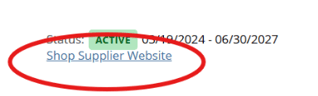
1. Navigate to the supplier website
From the appropriate Marketplace contract, select the supplier website or available punchout option.
2. Confirm Ship To and Bill To details
Select your applicable addresses and continue to the punchout.
3. Build your cart
Navigate the supplier's website and add the required items.
4. Return your cart to NJSTART
Complete the supplier-side checkout process used to return the cart to NJSTART.
5. Export the cart
Where available, select an export format such as CSV, cXML or PDF.
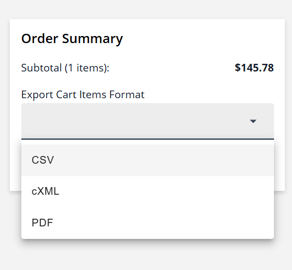
The exported information can then be retained with your purchasing documentation and used in your organization's purchasing process.
NJSTART now uses a contract-based Marketplace shopping model. Q3 reporting identified 340 informational Marketplace presences, nine active punchouts and three additional punchouts in implementation.
Buyer reminder: Marketplace does not replace your organization's procurement policies or the requirements of the applicable State contract. Always review the contract documentation before purchasing.
New & Updated State Contracts
NJSTART's State contract portfolio continues to change throughout the year as contracts are awarded, renewed, assigned and expire.
The September 2026 reconciliation provides a good example of that activity. NJSTART moved from 1,316 contracts at the end of August to 1,329 at the end of September. During that refresh:
-
39 contracts were newly awarded
-
50 contracts were renewed
-
26 newly awarded contracts were added to the All Spend Program
-
1 was added as Coop Only
Rather than publishing a list here that may quickly become outdated, buyers should use the latest NJSTART contract information when beginning a purchase.
NJSTART Around New Jersey
Some of the most valuable NJSTART conversations don't happen behind a computer screen.
Throughout 2026, the team continued working with purchasing professionals, associations, schools, municipalities, counties and other public organizations through events, presentations, training and direct education.
2026 outreach included events and engagements with organizations and audiences such as NJASBO, NJSACOP, NJGFOA, GPANJ, NJSBA and the New Jersey League of Municipalities, along with buyer training and organization-specific outreach.
The NJSTART team also provided an NJSTART training session for the City of Trenton on October 26.
At the program level, the strategy is deliberate: NJSTART's communications plan calls for webinars and workshops tailored to government buyers, participation in industry events and stronger relationships with New Jersey associations.
Those conversations help NJSTART understand what buyers are encountering in real purchasing situations and give buyers another opportunity to learn how State contracts can support their day-to-day needs.
What's Ahead in 2027
The buyer education and outreach work continues in the new year.
TECHSPO '27
January 27–29, 2027
Harrah's Atlantic City
NJSTART is scheduled for TECHSPO '27, continuing outreach to New Jersey's school and technology communities.
More Buyer Education
The NJSTART marketing program calls for continued quarterly webinars, Marketplace feature education and buyer-focused lifecycle communications, alongside in-person and association events.
Additional 2027 training and event dates will be shared as they are confirmed.
Buyer Q&A
Are vendors allowed to add fuel, transportation or shipping charges?
Check the applicable contract before approving the charge.
Most contracts do not allow vendors to simply add additional shipping charges unless the contract specifically permits them.
Review the applicable:
-
RFP or bid
-
Method of Operation
-
Participating Addendum, when applicable
-
Contract terms and associated documentation
If the answer isn't clear, email buyers@njstart.info. The NJSTART team can help you identify where to look for the applicable contract guidance.
How can I confirm that a vendor is authorized under a State contract?
Don't rely solely on the vendor's quote or website.
Search NJSTART for the applicable State contract and confirm the vendor is associated with that contract. Then review the contract record and supporting documentation.
Also confirm that the specific products or services you're purchasing are included in the contract scope.
I know what I need, but I don't know which State contract covers it. Where should I start?
Start by searching NJSTART Marketplace using the product, service or category you need.
Keep the search simple at first. Use the most distinctive terms and review the related contracts rather than building an overly specific search.
If you still aren't sure which contract applies, contact the NJSTART team at buyers@njstart.info.
Need Help? We're Here for You.
Have a question about finding a State contract, verifying a vendor, navigating Marketplace or understanding where to find purchasing requirements?
You don't have to figure it out alone.
Contact the NJSTART Buyer Support Team: buyers@njstart.info